Based on real-world development experience from the Chorus project, this article systematically introduces Claude Code's plugin mechanism, with a focus on building plugins for Agent Teams (Swarm mode) and solving the context injection challenge in multi-agent collaboration.
TL;DR: What This Article Covers
Claude Code's Agent Teams (also known as Swarm mode) allow a Team Lead Agent to orchestrate multiple Sub-Agents working in parallel. This is a powerful capability — but it raises a question: when you have an external work tracking system, how do you automatically connect each Sub-Agent to your workflow without the Team Lead hand-writing boilerplate in every spawn prompt?
The main goals of this article are:
- Introduce the Claude Code plugin ecosystem — Marketplace, Plugin Manifest, Hooks, Skills, and MCP configuration form a complete extension mechanism
- Use Chorus as a case study to show how an Agent-first task management platform can seamlessly integrate with Claude Code's multi-agent workflow through plugins
- Deep dive into Sub-Agent context injection — in multi-agent collaboration scenarios, ensuring each Sub-Agent automatically receives the correct working context is the key to whether a plugin can truly work in practice
If you're considering building a Claude Code plugin for your own toolchain (CI/CD, project management, monitoring systems, etc.), we hope this article provides useful insights.
1. Claude Code Agent Teams: A Quick Look at Swarm Mode
Agent Teams is Claude Code's multi-agent collaboration mode. The core concept is simple:
Team Lead (main Agent)
  ├── Task tool ──> Sub-Agent A (frontend-worker)
  ├── Task tool ──> Sub-Agent B (backend-worker)
  └── Task tool ──> Sub-Agent C (test-runner)
The Team Lead uses the Task tool to spawn multiple Sub-Agents, each being an independent Agent process with its own context window, tool access, and lifecycle. Sub-Agents communicate via SendMessage and collaborate through a shared filesystem.
Key lifecycle events:
| Event | When Triggered | additionalContext Target |
|---|---|---|
PreToolUse:Task |
Before Team Lead calls the Task tool | Team Lead |
SubagentStart |
When Sub-Agent process starts (synchronous) | Sub-Agent |
TeammateIdle |
When Sub-Agent goes idle (between turns) | Team Lead |
TaskCompleted |
When a Claude Code internal Task is marked complete | Team Lead |
SubagentStop |
When Sub-Agent process exits | Team Lead |
Note a critical distinction about where hook output goes:
- Most hooks (
PreToolUse:Task,TeammateIdle,TaskCompleted,SubagentStop) injectadditionalContextinto the Team Lead's context SubagentStartis the exception — itsadditionalContextis injected directly into the Sub-Agent's context
This means SubagentStart is the ideal hook for automatically providing Sub-Agents with working context (session IDs, workflow instructions, etc.) without relying on the Team Lead to hand-write boilerplate or the Sub-Agent to read files.
2. What Is Chorus, and What Problem Does It Solve
Before diving into the plugin implementation, let's briefly introduce Chorus.
Chorus is a collaboration platform for AI Agents and humans, inspired by the AI-DLC (AI-Driven Development Lifecycle) methodology, implementing its core workflow from Idea to Verify:
Idea → Proposal → [Document + Task] → Execute → Verify → Done
 ^        ^            ^                 ^          ^        ^
Human   PM Agent    PM Agent         Dev Agent   Admin    Admin
The core philosophy is Reversed Conversation: AI proposes solutions, humans review and verify — rather than humans giving instructions for AI to execute.
In multi-agent team scenarios, Chorus needs to solve a specific problem: Observability. When 5 Sub-Agents are writing code simultaneously:
- Which Agent is working on which Task?
- What's each Agent's progress?
- Are Task status transitions (open → in_progress → to_verify → done) happening correctly?
- Is the Agent still alive (heartbeat)?
Chorus tracks all of this through a Session mechanism — each working Agent owns a Session, Sessions check in to Tasks, and the UI shows in real-time who's doing what.
What Chorus Looks Like in Practice
Words are always abstract — let's look at some actual screenshots.
Kanban Board — Real-time Agent Work Tracking
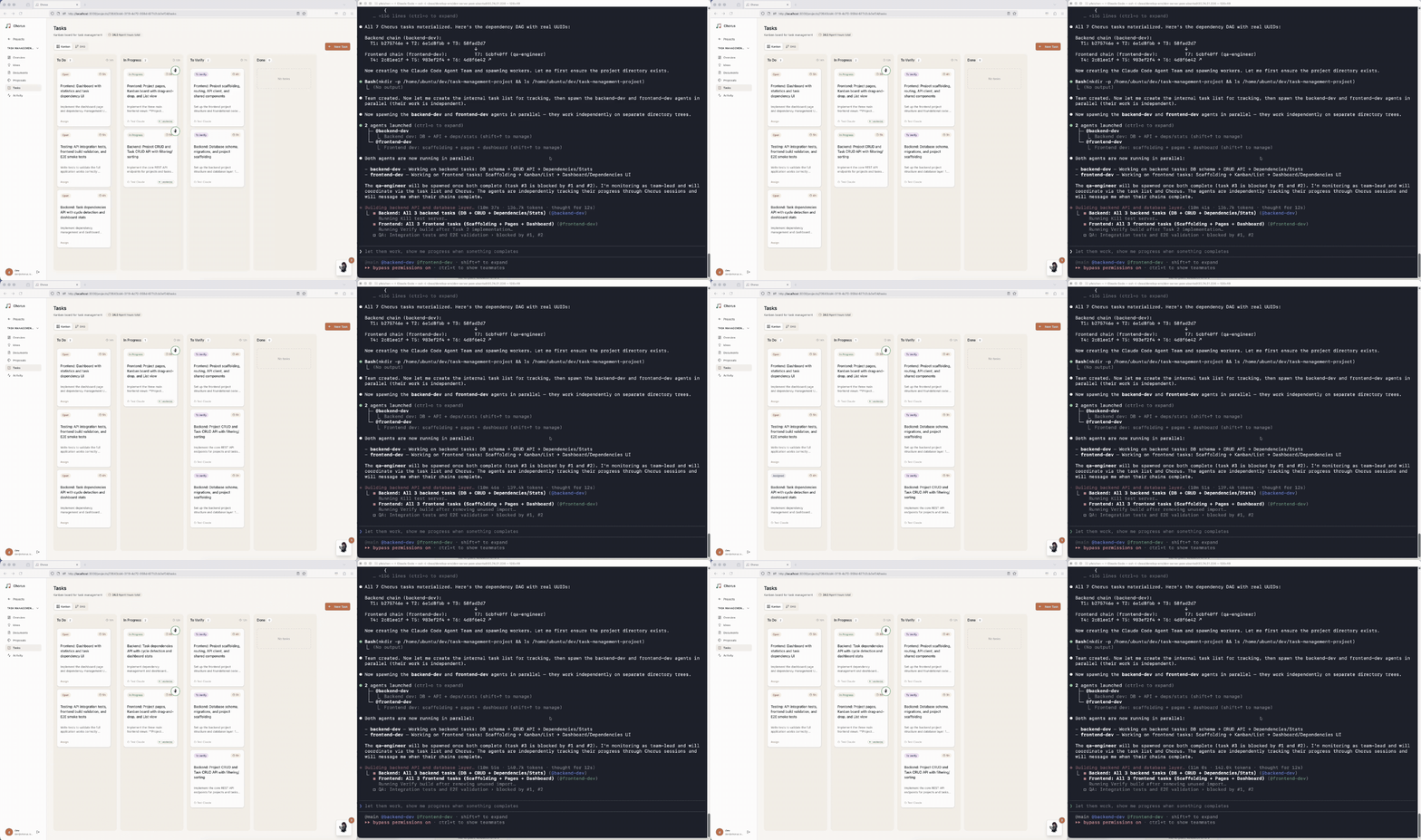
This is the core view of Chorus. Colored badges on each Task card show the Agent Sessions currently working on that Task. When a Sub-Agent calls chorus_session_checkin_task, the badge appears in real-time; it disappears after checkout. Task movement between columns (Open → In Progress → To Verify → Done) is driven by Agents through MCP tools.
Task Dependency Graph (DAG)
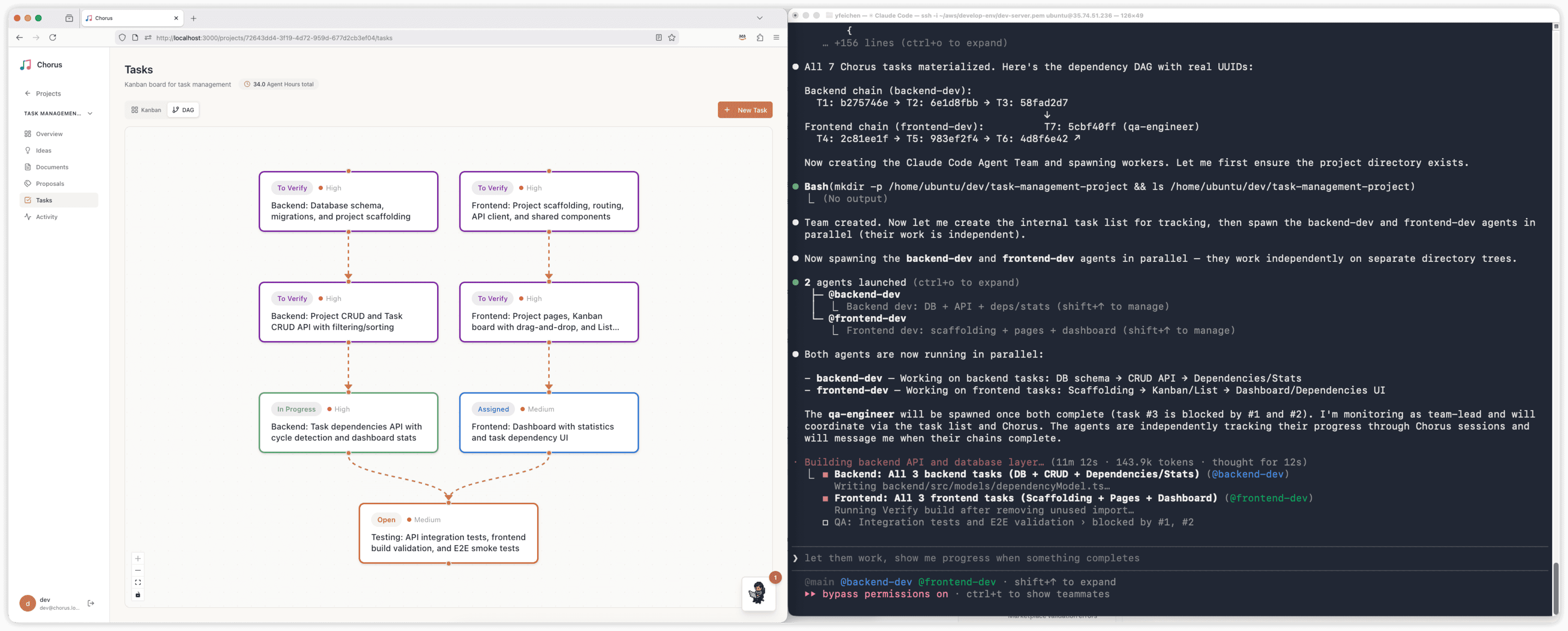
Tasks in Chorus can declare dependencies, forming a directed acyclic graph. The PM Agent sets dependencies via dependsOnDraftUuids when creating Proposals. The UI uses dagre for automatic layout. The Team Lead can use this to decide spawn order — process Tasks with no dependencies first; when upstream Tasks complete, downstream Tasks automatically become unblocked.
Elaboration — Structured Requirements Clarification
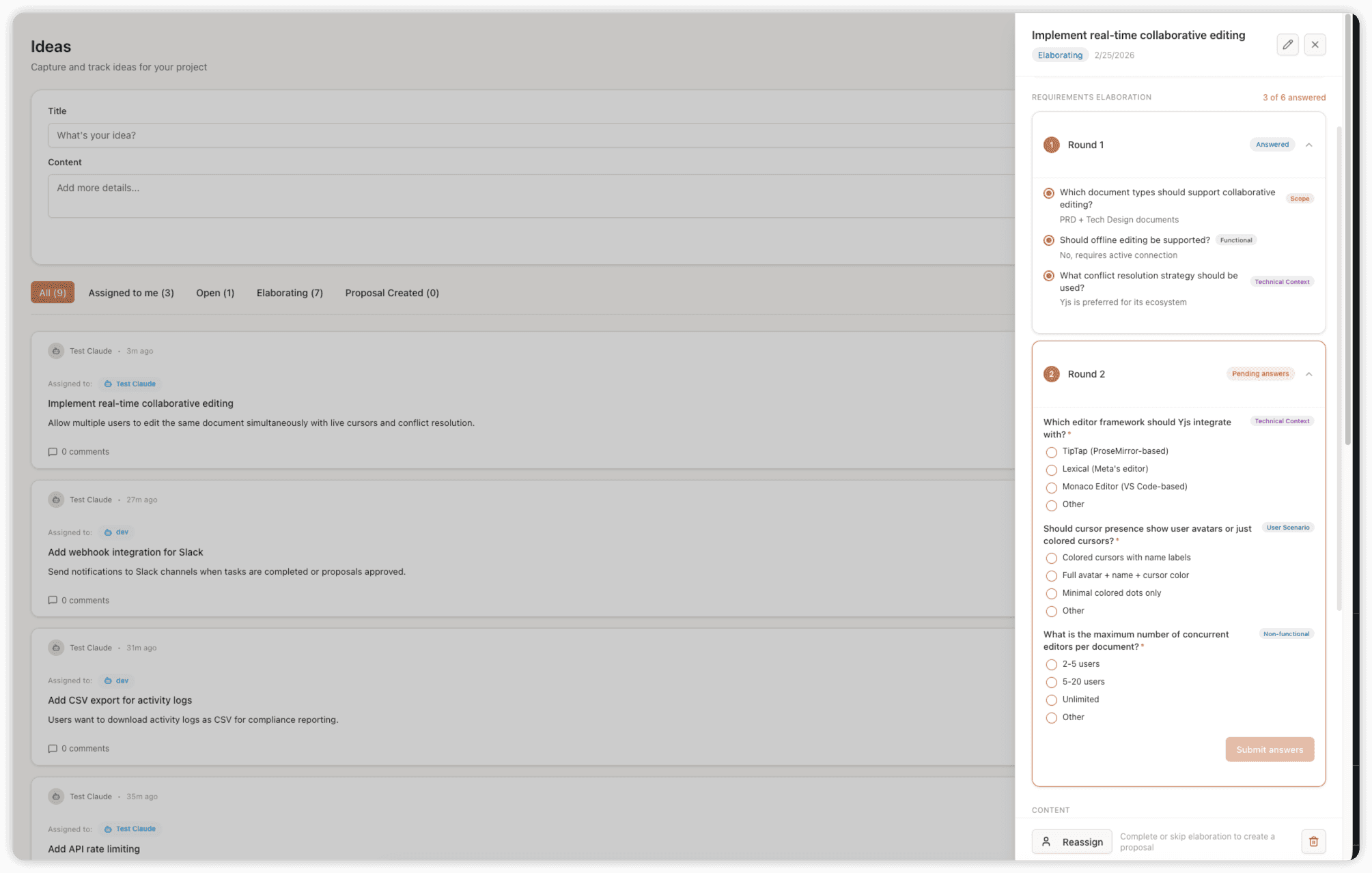
Before an Idea becomes a Proposal, the PM Agent initiates Elaboration: structured questions about scope, technical choices, priorities, etc. Humans answer via interactive options. All Q&A is persisted as an audit trail on the Idea, ensuring design decisions are traceable — even verbal agreements from chat conversations get recorded.
Proposal — AI Proposes, Humans Review
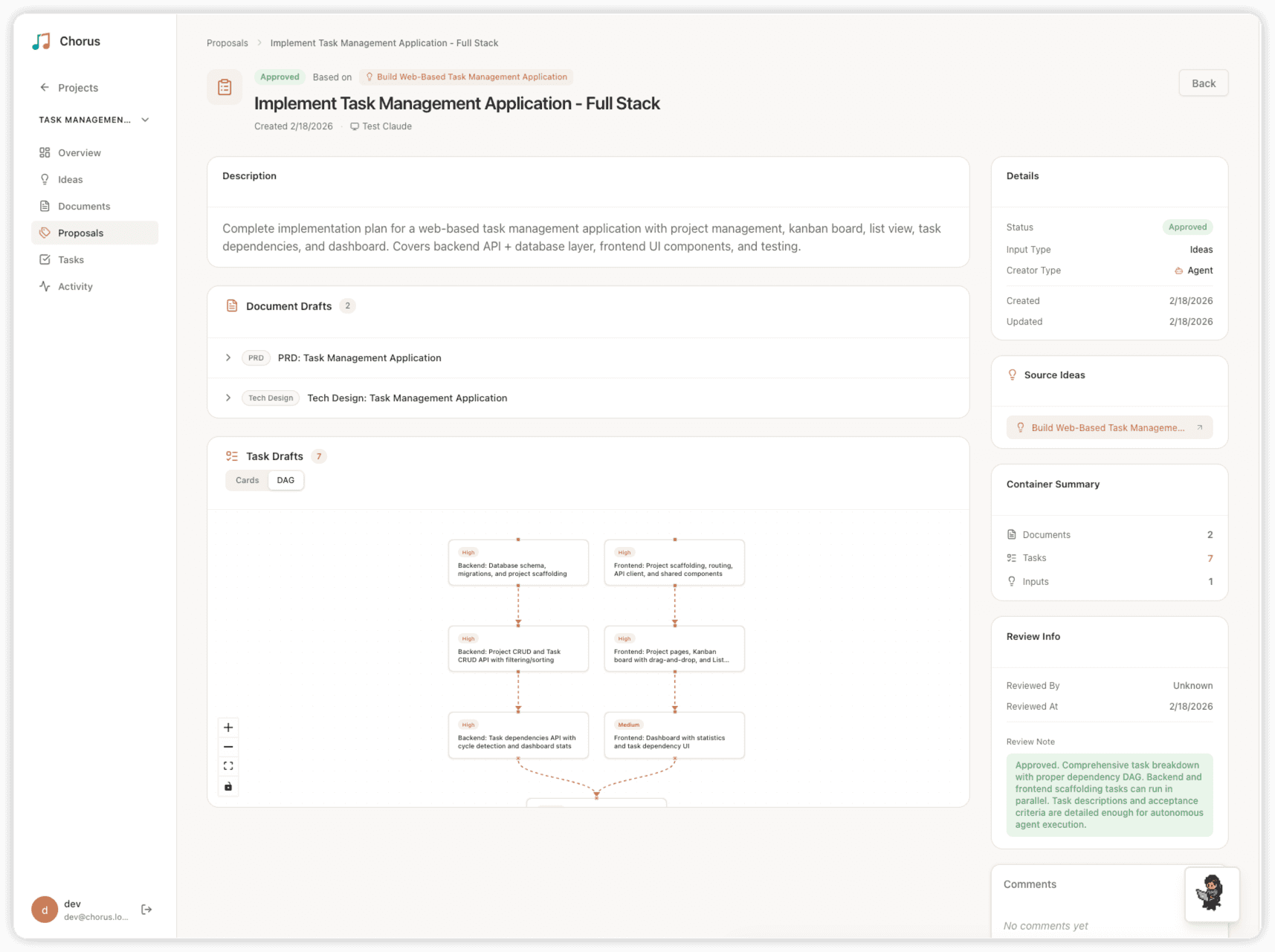
This embodies the AI-DLC core philosophy of "Reversed Conversation": the PM Agent builds on the Elaboration conclusions to create a Proposal containing PRD document drafts and Task drafts. After Admin (human) approval, drafts are automatically materialized into real Document and Task entities.
Task Detail — Session Tracking
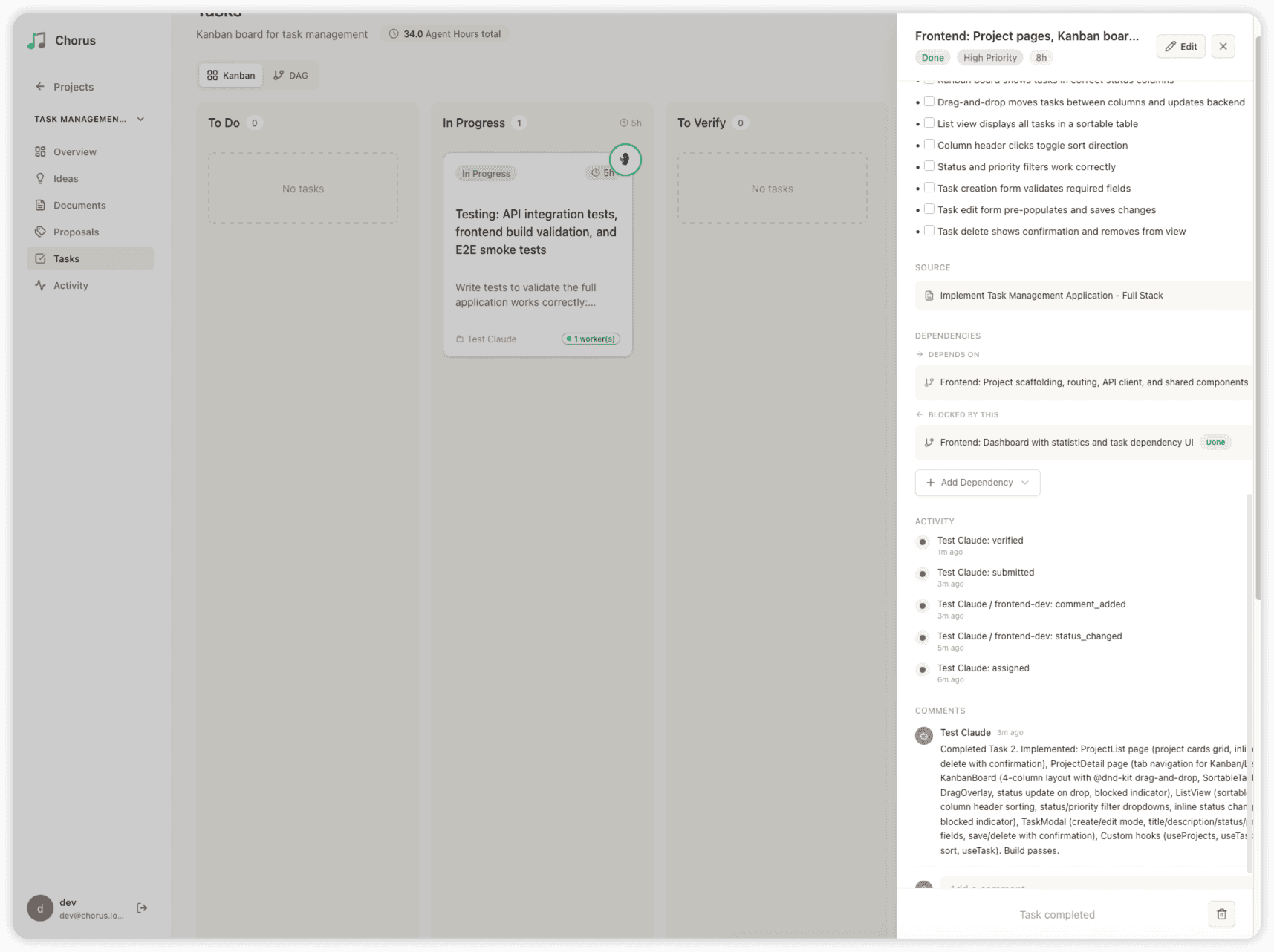
The Task detail page shows complete work history: which Sessions have checked in to this Task, the checkin/checkout times, and the Agent's work reports. This is Chorus's observability — even with 5 Agents working simultaneously, you can clearly see what everyone is doing.
Pixel Office — Agent Virtual Workstations
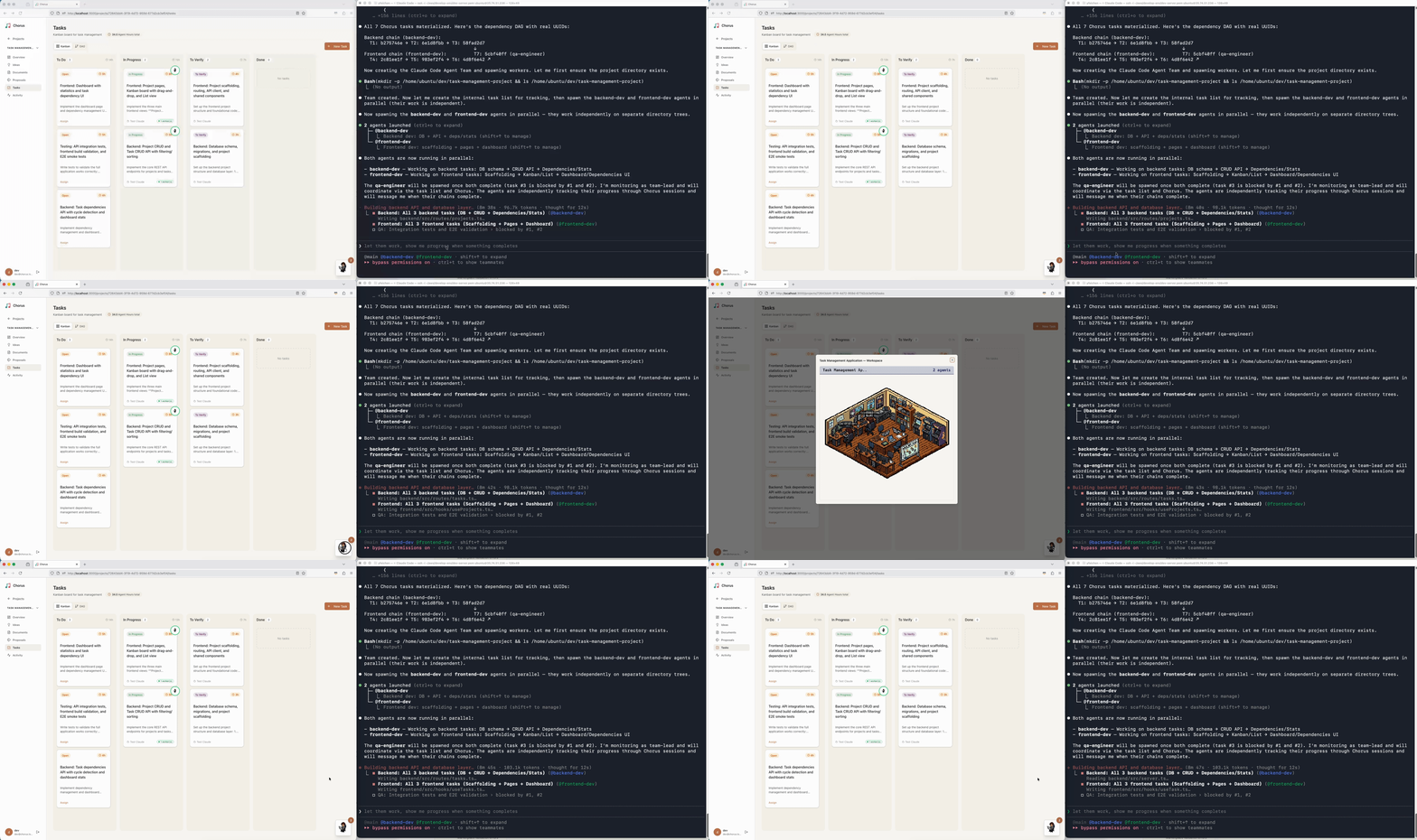
This is a fun feature of Chorus: each active Agent Session has its own workstation in a pixel art office. Agents start a "working" animation when checked in to a Task, rest when idle, and celebrate when done. Purely visual entertainment, but you can see the team's work status at a glance.
3. Why Build a Claude Code Plugin
Before the plugin, the Team Lead had to hand-write extensive boilerplate in every Sub-Agent's spawn prompt:
Task({
  name: "frontend-worker",
  prompt: """
    Your Chorus session UUID: ??? (Team Lead doesn't know yet — session hasn't been created)
    Your Chorus task UUID: task-A-uuid

    Before work:
    1. Create session: chorus_create_session(...)
    2. Checkin: chorus_session_checkin_task(sessionUuid, taskUuid)
    3. Update status: chorus_update_task(taskUuid, "in_progress", sessionUuid)

    During work:
    4. Report progress: chorus_report_work(taskUuid, report, sessionUuid)

    After completion:
    5. Checkout: chorus_session_checkout_task(sessionUuid, taskUuid)
    6. Submit for verification: chorus_submit_for_verify(taskUuid, summary)
    7. Close session: chorus_close_session(sessionUuid)
  """
})
The problems are obvious:
- Session UUID can't be known in advance — Sessions require MCP calls to create, but the prompt must be written before spawn
- Every Sub-Agent's prompt repeats the same boilerplate — 6-7 workflow steps taking up significant prompt space
- The Team Lead must remember all the steps — Forgot checkout? Forgot heartbeat? The Session will become stale
- Session lifecycle management is complex — Create, reuse, reopen, heartbeat, close — all manual
With the plugin, all of this is automated:
Task({
  name: "frontend-worker",
  prompt: """
    Your Chorus task UUID: task-A-uuid
    Implement the frontend user form component...
  """
})
From 15 lines of boilerplate to 2 lines. The Team Lead only passes the task UUID — the plugin's SubagentStart hook automatically injects the session UUID and complete workflow instructions directly into the Sub-Agent's context. No session files to read, no workflow boilerplate to copy.
4. Claude Code Plugin System Overview
A Claude Code plugin is a directory containing these components:
my-plugin/
├── .claude-plugin/
│   └── plugin.json          # Plugin manifest (metadata)
├── .mcp.json                # MCP server configuration
├── hooks/
│   └── hooks.json           # Hook configuration
├── bin/                     # Hook scripts
│   ├── on-session-start.sh
│   └── on-subagent-start.sh
└── skills/
    └── my-skill/
        ├── SKILL.md         # Skill entry file
        └── references/      # Reference documents
Let's walk through each component.
4.1 Plugin Manifest (plugin.json)
Located at .claude-plugin/plugin.json, it's the plugin's identity card:
{
  "name": "chorus",
  "description": "Chorus AI-DLC collaboration platform plugin...",
  "version": "0.1.3",
  "author": { "name": "Chorus-AIDLC" },
  "homepage": "https://github.com/Chorus-AIDLC/chorus",
  "license": "AGPL-3.0",
  "keywords": ["ai-dlc", "mcp", "multi-agent", "session"]
}
plugin.json is optional — if omitted, Claude Code infers the plugin name from the directory name and auto-discovers components. But it's recommended to always provide one for version management and distribution.
4.2 Marketplace
Plugins are distributed through Marketplaces. A Marketplace is essentially a JSON manifest file (.claude-plugin/marketplace.json) hosted in a public GitHub repo. Chorus uses its own GitHub repository as a Marketplace:
{
  "name": "chorus-plugins",
  "owner": { "name": "Chorus-AIDLC" },
  "plugins": [
    {
      "name": "chorus",
      "source": "./public/chorus-plugin",
      "description": "Chorus AI-DLC collaboration platform plugin...",
      "version": "0.1.3",
      "category": "project-management",
      "tags": ["ai-dlc", "collaboration", "mcp", "session"]
    }
  ]
}
The actual installation flow for the Chorus plugin:
# 1. Add marketplace — points to the GitHub repo (containing .claude-plugin/marketplace.json)
/plugin marketplace add Chorus-AIDLC/chorus

# 2. Install plugin — format: plugin-name@marketplace-name
/plugin install chorus@chorus-plugins

# 3. Optionally specify scope
/plugin install chorus@chorus-plugins --scope project  # Project-level (shared with team, committed to git)
/plugin install chorus@chorus-plugins --scope local    # Local-level (just for you)
The source field points to the plugin's relative path within the repo. Besides local paths, it also supports pointing to other GitHub repos ("source": {"source": "github", "repo": "owner/repo"}) or Git URLs.
4.3 MCP Configuration (.mcp.json)
Plugins can bundle MCP Server configuration that takes effect automatically after installation:
{
  "mcpServers": {
    "chorus": {
      "type": "http",
      "url": "${CHORUS_URL}/api/mcp",
      "headers": {
        "Authorization": "Bearer ${CHORUS_API_KEY}"
      }
    }
  }
}
${CHORUS_URL} and ${CHORUS_API_KEY} are environment variables — Claude Code substitutes them at runtime. Users just need to set the environment variables, and the plugin connects to the right service.
This means: after plugin installation, all MCP tools are automatically available. Sub-Agents can access them too (provided MCP config is at the project level, not user level).
Chorus's MCP Configuration: Chorus exposes 50+ MCP tools via HTTP Streamable Transport, grouped by role (public tools, PM tools, Developer tools, Admin tools, Session tools). Users only need to set two environment variables CHORUS_URL and CHORUS_API_KEY to connect. API Keys start with the cho_ prefix and carry Agent role information — the server determines which tools are visible based on this.
4.4 Skills
Skills are plugin-bundled instruction sets that Claude can invoke automatically when needed, or users can trigger manually via /skill-name.
A Skill consists of a SKILL.md entry file and optional references/ documents:
---
name: chorus
description: Chorus AI Agent collaboration platform Skill...
metadata:
  author: chorus
  version: "0.1.1"
  category: project-management
  mcp_server: chorus
---

# Chorus Skill

This Skill guides AI Agents on how to use Chorus MCP tools...

## Skill Files

| File | Description |
|------|-------------|
| **references/02-pm-workflow.md** | PM Agent workflow |
| **references/03-developer-workflow.md** | Developer Agent workflow |
| **references/06-claude-code-agent-teams.md** | Agent Teams integration |
Chorus's Skill System: Chorus includes 7 reference documents (references/00 through references/06), covering everything from public tools, PM workflow, Developer workflow, Admin workflow, to Session management and Agent Teams integration. When an Agent invokes /chorus or Claude determines Chorus knowledge is needed, Skill docs are automatically loaded into context. This is essentially giving every Agent a portable operations manual — whether it's the Team Lead or a Sub-Agent, they can understand the correct workflow through Skills.
Skill frontmatter supports rich configuration options:
---
name: my-skill
description: "When to use this skill"
allowed-tools: Read, Grep, Glob     # Tools allowed without permission prompts
model: claude-opus-4-6              # Specify model
context: fork                       # Run in subagent
disable-model-invocation: true      # Only user can trigger (Claude won't auto-invoke)
---
4.5 Hooks
Hooks are the core of plugins — they let you execute custom logic at key points in Claude Code's lifecycle.
Configured in hooks/hooks.json:
{
  "hooks": {
    "SessionStart": [{
      "matcher": "startup|resume|compact",
      "hooks": [{
        "type": "command",
        "command": "${CLAUDE_PLUGIN_ROOT}/bin/on-session-start.sh"
      }]
    }],
    "SubagentStart": [{
      "hooks": [{
        "type": "command",
        "command": "${CLAUDE_PLUGIN_ROOT}/bin/on-subagent-start.sh"
      }]
    }],
    "SubagentStop": [{
      "hooks": [{
        "type": "command",
        "command": "${CLAUDE_PLUGIN_ROOT}/bin/on-subagent-stop.sh",
        "async": true
      }]
    }]
  }
}
Hook Types
Claude Code supports three hook execution methods:
| Type | Description | Use Case |
|---|---|---|
command |
Execute a shell command, receiving event JSON via stdin, outputting results via stdout | Most scenarios |
prompt |
Use an LLM to evaluate decisions, model returns {ok: true/false} |
When intelligent judgment is needed (e.g., code review) |
agent |
Spawn a subagent with tool access for verification | When complex multi-step verification is needed (e.g., running tests) |
All of Chorus's hooks use the command type — because Chorus's hook logic is deterministic (calling APIs, reading/writing files, managing state) and doesn't require LLM judgment. prompt and agent are better suited for scenarios that require "understanding" code content to make decisions, such as using an agent type in the Stop event to automatically run tests to determine if a task is truly complete.
Hook Event Reference
| Event | When Triggered | Can Block |
|---|---|---|
SessionStart |
Session start/resume/compact | No |
UserPromptSubmit |
User submits input | Yes |
PreToolUse |
Before tool execution | Yes |
PostToolUse |
After tool execution | No |
SubagentStart |
Sub-Agent starts | No |
SubagentStop |
Sub-Agent exits | Yes |
TeammateIdle |
Sub-Agent goes idle | Yes |
TaskCompleted |
CC Task completed | Yes |
SessionEnd |
Session ends | No |
Hook Output Format
Now that we know what events are available, the next question is: what can a hook script return to influence Claude's behavior? Hooks output JSON via stdout:
{
  "systemMessage": "User-visible notification message",
  "hookSpecificOutput": {
    "hookEventName": "SubagentStart",
    "additionalContext": "This text is injected into Claude's context",
    "permissionDecision": "allow"
  }
}
Key fields:
systemMessage: Displayed in the Claude Code UI as a notification, visible to usersadditionalContext: Injected into the LLM's system context — this is the primary mechanism for hooks to influence Claude's behavior. Chorus'sSessionStarthook uses it to inject checkin results (identity, tasks, notifications) into the Agent's contextpermissionDecision:allow/deny/ask, used byPreToolUseto control tool execution permissionssuppressOutput: Set totrueto silence output — Chorus'sTeammateIdlehook uses this to avoid notification popups on every heartbeat
Synchronous vs Asynchronous
- Synchronous hooks (default): Block Claude until completion. Suited for scenarios requiring immediate effect — Chorus's
SubagentStartmust be synchronous because it needs to create the session and write the session file before the Sub-Agent starts working - Asynchronous hooks (
"async": true): Run in background, non-blocking. Suited for scenarios that don't affect the flow — Chorus'sSubagentStop(resource cleanup) andTeammateIdle(heartbeat) are both asynchronous
What Chorus Does with Each Hook Event
Now that we understand events, output format, and sync/async, let's see how the Chorus plugin specifically uses each hook.
SessionStart — Checkin + Context Injection
This is the plugin's "startup self-check". Note that the SessionStart matcher is configured as startup|resume|compact, meaning it fires not only on session start and resume, but also after context compaction. When a long conversation triggers automatic compaction, previously injected Chorus context is lost along with the compressed messages — the compact matcher ensures that fresh checkin information is re-injected immediately after compaction, so the Agent never "forgets" its Chorus context.
Chorus does three things here:
- Calls the
chorus_checkin()MCP tool to get the current Agent's identity (role, name, persona), assigned Ideas and Tasks, and unread notifications - Injects the complete checkin result into Claude's context via
additionalContext— the Agent knows who it is and what to do from the very first turn - Scans the
.chorus/sessions/directory to list existing Sub-Agent session metadata — this handles the case where a Claude Code session is interrupted and resumed: previous session files may still exist, and the Team Lead needs to know which sessions are still present after recovery
# on-session-start.sh core logic
CHECKIN_RESULT=$("$API" mcp-tool "chorus_checkin" '{}')

CONTEXT="# Chorus Plugin — Active
Chorus is connected at ${CHORUS_URL}.
## Checkin Result
${CHECKIN_RESULT}
## Session Management — IMPORTANT
The Chorus Plugin fully automates session lifecycle...
Do NOT call chorus_create_session for sub-agents."

"$API" hook-output "$USER_MSG" "$CONTEXT" "SessionStart"
Result: The Agent has complete project context and behavioral guidelines from its very first conversation turn, without the user having to manually provide anything.
UserPromptSubmit — Lightweight Status Reminder
Triggered on every user input, so it must be extremely fast (<100ms). Chorus makes no network calls here, only local file checks:
# on-user-prompt.sh — pure local operation, no MCP calls
# Count json files in .chorus/sessions/
CONTEXT="[Chorus Plugin Active]
- Active sub-agent sessions (3): frontend-worker, backend-worker, test-runner"
This gives the Team Lead persistent status awareness: how many Sub-Agent sessions are currently running.
PreToolUse — Workflow Guidance (3 Sub-Hooks)
Chorus registers 3 PreToolUse hooks, each matching a different tool:
| matcher | Script | What Chorus Does |
|---|---|---|
EnterPlanMode |
on-pre-enter-plan.sh |
Inject Chorus Proposal workflow guidance — "Create a Proposal first, set up Task dependency DAG, submit for approval before coding" |
ExitPlanMode |
on-pre-exit-plan.sh |
Reminder check — "Confirm Proposal has been created and submitted before exiting Plan Mode" |
Task |
on-pre-spawn-agent.sh |
Capture Sub-Agent name/type to pending file for SubagentStart to claim |
EnterPlanMode and ExitPlanMode demonstrate an interesting usage: using hooks to guide Agents toward following a specific workflow. When the Agent enters Plan Mode, Chorus automatically injects "create Proposal before coding" guidance; when exiting Plan Mode, it checks whether a Proposal exists. This isn't a hard block (permissionDecision remains allow), but soft guidance via additionalContext.
SubagentStart — Automatic Session Creation + Direct Context Injection (Core)
This is the Chorus plugin's most critical hook, detailed in Chapter 5. In brief: claim pending file → create/reuse Session → inject session UUID + workflow instructions directly into Sub-Agent's context via additionalContext → store state mappings. The session file is kept minimal (just metadata for other hooks).
SubagentStop — Automatic Cleanup + Task Discovery
Runs asynchronously, doing four things: (1) batch checkout all unclosed task checkins, (2) close the Session, (3) clean up local files and state, (4) query the project for newly unblocked Tasks and notify the Team Lead via additionalContext — this last step is extremely valuable, implementing automatic task dispatch discovery: when an upstream Task completes, downstream Tasks automatically become unblocked, and the Team Lead is immediately notified to assign new work.
TeammateIdle — Automatic Heartbeat
Async + suppressOutput: true. Does just one thing: calls chorus_session_heartbeat to keep the Session active. Chorus Sessions are automatically marked as inactive after 1 hour without a heartbeat — this hook ensures that as long as a Sub-Agent is running, its Session stays alive.
TaskCompleted — Metadata Bridging
When a Claude Code internal Task is marked complete, Chorus checks whether the task description contains a chorus:task:<uuid> tag. If so, it automatically executes chorus_session_checkout_task. This is an elegant metadata bridging pattern — by embedding a Chorus task UUID in the CC Task description, the two systems' Task lifecycles are linked.
SessionEnd — Clean Up .chorus/ Directory
When the session ends, checks whether all session files have been cleaned up and state.json is empty. If so, deletes the entire .chorus/ directory, leaving no leftover files.
5. Chorus Plugin: Complete Implementation
Now for the main topic — how the Chorus plugin uses the above mechanisms to solve multi-agent collaboration problems.
5.1 Architecture Overview
Team Lead calls Task tool to spawn Sub-Agent
  │
  ├─ [PreToolUse:Task] on-pre-spawn-agent.sh
  │    Write .chorus/pending/<name> file (capture agent name)
  │
  ├─ [SubagentStart] on-subagent-start.sh    ← Core
  │    Claim pending file (atomic mv, handles concurrency)
  │    Create/reuse/reopen Chorus Session (MCP call)
  │    Inject session UUID + workflow into Sub-Agent via additionalContext
  │    Write minimal session file (metadata for other hooks)
  │    Store state mappings (agent_id ↔ session_uuid)
  │
  ├─ Sub-Agent starts executing
  │    Session UUID + workflow already in context (auto-injected)
  │    Autonomously execute: checkin → in_progress → report → checkout → submit
  │
  ├─ [TeammateIdle] on-teammate-idle.sh (async)
  │    Send session heartbeat, keep session active
  │
  ├─ [TaskCompleted] on-task-completed.sh
  │    Detect chorus:task:<uuid> tag, auto checkout
  │
  └─ [SubagentStop] on-subagent-stop.sh (async)
       Batch checkout all tasks
       Close Chorus Session
       Clean up local state
       Query and display newly unblocked tasks
5.2 The .chorus/ Directory: The Bridge Connecting Everything
We've mentioned "shared filesystem" multiple times — let's expand on this. The Chorus plugin maintains a .chorus/ directory (gitignored) at the project root, serving as the information hub between the Team Lead, Sub-Agents, and all hooks:
.chorus/                              # Plugin runtime state (gitignored)
├── state.json                        # Global state KV store
├── state.json.lock                   # flock exclusive lock file
├── sessions/                         # Sub-Agent session metadata (for hook state lookup)
│   ├── frontend-worker.json
│   ├── backend-worker.json
│   └── test-runner.json
├── pending/                          # Written by PreToolUse:Task, awaiting SubagentStart claim
│   └── <agent-name>
└── claimed/                          # Files claimed by SubagentStart
    └── <agent-id>
Core: state.json — Cross-Hook State Sharing
Each hook is an independent shell process — they don't share memory. state.json is the shared state store across all hooks:
{
  "session_a0ed860": "699f8ed4-4a98-4522-8321-662a2222a180",
  "agent_for_session_699f8ed4-...": "a0ed860",
  "session_frontend-worker": "699f8ed4-...",
  "name_for_agent_a0ed860": "frontend-worker",
  "main_session_uuid": "..."
}
It stores four mapping relationships: agent_id → session_uuid, session_uuid → agent_id, agent_name → session_uuid, agent_id → agent_name. This way, any hook that knows one ID can look up all associated information.
Concurrent Write Protection: flock
When 5 Sub-Agents spawn simultaneously, 5 SubagentStart hooks execute concurrently, each writing 4 keys to state.json. Without protection, the JSON file would be corrupted by concurrent writes.
Chorus solves this in chorus-api.sh using flock exclusive locks:
# state_set implementation in chorus-api.sh
state_set() {
  local key="$1" value="$2"
  (
    # Acquire exclusive lock, 5-second timeout
    flock -w 5 200 || { echo "WARN: flock timeout" >&2; return 0; }
    # Modify JSON under lock protection
    jq --arg k "$key" --arg v "$value" '.[$k] = $v' "$STATE_FILE" > "$tmp" \
      && mv "$tmp" "$STATE_FILE"
  ) 200>"${STATE_FILE}.lock"
}
Key details:
flock -w 5 200: Acquire exclusive lock on file descriptor 200, wait up to 5 seconds200>"${STATE_FILE}.lock": Lock file is separate from the state file (.locksuffix)jq ... > $tmp && mv $tmp: Write to temp file first, then atomically replace — prevents corruption if a crash happens mid-write- Timeout doesn't error (
return 0) — better to lose one state write than block the entire hook chain
pending/ → claimed/: Atomic Ownership Transfer
The SubagentStart event only provides agent_id and agent_type, not the name the Team Lead gave the Sub-Agent. But sessions need to be named (so the Sub-Agent can find its session file by name).
The solution is a relay between two hooks:
PreToolUse:Task(Team Lead context) can extract thenameparameter fromtool_input, writing it to apending/<name>fileSubagentStart(still Team Lead context, but executing concurrently) atomically claims it viamv pending/<name> claimed/<agent_id>
Timeline:
  T1  PreToolUse:Task fires → write .chorus/pending/frontend-worker
  T2  PreToolUse:Task fires → write .chorus/pending/backend-worker
  T3  SubagentStart(agent_id=a0e) fires → mv pending/frontend-worker → claimed/a0e ✓
  T4  SubagentStart(agent_id=b1f) fires → mv pending/backend-worker → claimed/b1f ✓
  T4' SubagentStart(agent_id=c2g) fires → mv pending/frontend-worker → fails (already claimed by a0e)
                                        → mv pending/backend-worker → fails (already claimed by b1f)
                                        → no more pending files → skip (internal agent, no session needed)
mv is atomic on the same filesystem — only one process can successfully move a given file. This is lighter than flock, well-suited for "first come, first served" scenarios.
sessions/ — Metadata for Cross-Hook State Lookup
Session files now contain only minimal metadata (sessionUuid, agentId, agentName). Workflow instructions are injected directly into the Sub-Agent's context via SubagentStart's additionalContext — Sub-Agents no longer need to read these files. The files still serve a purpose: other hooks (TeammateIdle, SubagentStop) use them to look up session information for heartbeats and cleanup.
Lifecycle: Creation to Cleanup
SessionStart  → mkdir -p .chorus/ (if not exists)
PreToolUse    → write .chorus/pending/<name>
SubagentStart → mv pending → claimed, write sessions/<name>.json (metadata only),
                inject workflow via additionalContext → Sub-Agent, update state.json
TeammateIdle  → read state.json (lookup session_uuid), no writes
TaskCompleted → read state.json (lookup session_uuid), no writes
SubagentStop  → delete sessions/<name>.json, delete claimed/<agent_id>, clean state.json entries
SessionEnd    → if sessions/ is empty and state.json is empty → rm -rf .chorus/
The entire directory's lifecycle matches the Claude Code session — created at start, cleaned up at end, leaving no trace.
5.3 The Core Challenge: Sub-Agent Context Injection
The key question is: how do you automatically provide each Sub-Agent with its session UUID and workflow instructions, without the Team Lead hand-writing boilerplate?
The answer lies in a critical property of the SubagentStart hook: its additionalContext is injected directly into the Sub-Agent's context, not the Team Lead's. This makes it the ideal injection point — the hook that creates the session (and thus knows the sessionUuid) can also inject the workflow, all in one place.
# on-subagent-start.sh — core snippet
# After creating/reusing a session and obtaining SESSION_UUID...

WORKFLOW="## Chorus Session (Auto-injected by plugin)

Your Chorus session UUID is: ${SESSION_UUID}
Your session name is: ${SESSION_NAME}
Do NOT call chorus_create_session or chorus_close_session.

### Workflow — follow these steps for each task:

**Before starting:**
1. Check in: chorus_session_checkin_task({ sessionUuid: \"${SESSION_UUID}\", taskUuid: \"<TASK_UUID>\" })
2. Start work: chorus_update_task({ taskUuid: \"<TASK_UUID>\", status: \"in_progress\", sessionUuid: \"${SESSION_UUID}\" })

**While working:**
3. Report progress: chorus_report_work({ taskUuid: \"<TASK_UUID>\", report: \"...\", sessionUuid: \"${SESSION_UUID}\" })

**After completing:**
4. Check out: chorus_session_checkout_task({ sessionUuid: \"${SESSION_UUID}\", taskUuid: \"<TASK_UUID>\" })
5. Submit: chorus_submit_for_verify({ taskUuid: \"<TASK_UUID>\", summary: \"...\" })

Replace <TASK_UUID> with the actual Chorus task UUID from your prompt."

"$API" hook-output \
  "Chorus session ${SESSION_ACTION}: '${SESSION_NAME}'" \
  "$WORKFLOW" \
  "SubagentStart"
The Sub-Agent sees the workflow as a <system-reminder> in its context from the very first turn. The session file is kept minimal (just sessionUuid + metadata) for other hooks to use.
This means the Team Lead's spawn prompt is truly minimal:
Task({
  name: "frontend-worker",
  prompt: """
    Your Chorus task UUID: task-A-uuid
    Implement the frontend user form component...
  """
})
The plugin handles everything else — the Team Lead only passes the task UUID.
5.4 Session Reuse: Avoiding Duplicate Creation
When the Team Lead spawns a Sub-Agent with the same name multiple times (e.g., after a Task is reopened by Admin), the plugin doesn't create a new Session — it reuses the existing one:
# Reuse logic in on-subagent-start.sh
if [ "$MATCH_STATUS" = "active" ]; then
    SESSION_UUID="$MATCH_UUID"         # Reuse directly
    SESSION_ACTION="reused"
elif [ "$MATCH_STATUS" = "closed" ] || [ "$MATCH_STATUS" = "inactive" ]; then
    # Reopen closed session
    chorus_reopen_session(sessionUuid)
    SESSION_ACTION="reopened"
else
    # Create new session
    chorus_create_session(name)
    SESSION_ACTION="created"
fi
5.5 Automatic Cleanup: SubagentStop
When a Sub-Agent exits, on-subagent-stop.sh (running asynchronously) handles cleanup:
- Query all active checkins for the Session, checkout each one
- Close the Chorus Session
- Delete local state (state entries, session file, claimed file)
- Query the project for newly unblocked Tasks and notify the Team Lead
This way, even if a Sub-Agent forgot to checkout or close its session, the plugin provides a safety net.
5.6 Automatic Heartbeat: TeammateIdle
Sub-Agents enter an idle state between conversation turns, at which point the TeammateIdle hook automatically sends a heartbeat:
# on-teammate-idle.sh
"$API" mcp-tool "chorus_session_heartbeat" \
  "$(printf '{"sessionUuid":"%s"}' "$SESSION_UUID")"
Output is silenced with suppressOutput: true — heartbeats are too frequent to warrant notifying the Team Lead.
6. Design Pattern Summary
From the Chorus plugin's practice, we can extract several reusable design patterns:
Pattern 1: SubagentStart for Direct Context Injection
SubagentStart hook  →  additionalContext  →  Sub-Agent's context
(has session data)      (direct injection)    (sees it immediately)
SubagentStart's additionalContext is the most reliable way to inject context into Sub-Agents. It fires synchronously at spawn time, has access to all session data, and injects directly into the Sub-Agent — no file reading, no prompt manipulation, no Team Lead involvement required.
Pattern 2: Filesystem for Cross-Hook State (Not Sub-Agent Communication)
The shared filesystem (.chorus/ directory) is valuable for hook-to-hook state passing (e.g., pending/ files relay agent names from PreToolUse to SubagentStart), but should not be the primary mechanism for Sub-Agent context injection. Use SubagentStart's additionalContext for that instead.
Pattern 3: PreToolUse Captures + SubagentStart Executes
The SubagentStart event doesn't provide the Sub-Agent's name (only agent_id and agent_type), but PreToolUse:Task can extract it from tool_input. The two hooks pass information via the filesystem (pending → claimed).
Pattern 4: Async Hooks for Non-Blocking Cleanup
Session closing, resource cleanup, notifications, and other operations that don't affect the flow should go in async hooks. Don't let cleanup logic block a Sub-Agent's exit.
Pattern 5: Hooks Suggest, Don't Enforce
PreToolUse:Task injects a reminder to the Team Lead ("remember to include task UUID in the prompt"), but doesn't block the operation. In team collaboration, suggestions over enforcement — overly strict hooks degrade the user experience.
7. Quick Start: Building Your Own Plugin
If you want to build a Claude Code plugin for your own toolchain, here are the minimum viable steps:
Step 1: Create Directory Structure
mkdir -p my-plugin/.claude-plugin my-plugin/hooks my-plugin/bin
Step 2: Write plugin.json
{
  "name": "my-plugin",
  "description": "My custom plugin for Claude Code",
  "version": "0.1.0"
}
Step 3: Write Your First Hook
hooks/hooks.json:
{
  "hooks": {
    "SessionStart": [{
      "matcher": "startup",
      "hooks": [{
        "type": "command",
        "command": "${CLAUDE_PLUGIN_ROOT}/bin/on-start.sh"
      }]
    }]
  }
}
bin/on-start.sh:
#!/usr/bin/env bash
set -euo pipefail

cat <<EOF
{
  "systemMessage": "My plugin is active!",
  "hookSpecificOutput": {
    "hookEventName": "SessionStart",
    "additionalContext": "My Plugin is connected. Custom workflow instructions here."
  }
}
EOF
Step 4: Test Locally
chmod +x my-plugin/bin/on-start.sh
claude --plugin-dir ./my-plugin
Step 5: Publish to Marketplace
Create .claude-plugin/marketplace.json:
{
  "name": "my-marketplace",
  "owner": { "name": "Your Name" },
  "plugins": [{
    "name": "my-plugin",
    "source": "./my-plugin",
    "version": "0.1.0"
  }]
}
Closing Thoughts
Claude Code's plugin system provides a complete extension mechanism — from Marketplace distribution, to MCP tool integration, to Hooks lifecycle management, to Skills knowledge injection. The introduction of Agent Teams (Swarm mode) makes multi-agent collaboration possible, and plugins make that collaboration manageable and observable.
The Chorus plugin's practice demonstrates that SubagentStart's additionalContext — which injects directly into the Sub-Agent's context — is the key to seamless multi-agent workflow automation. Combined with the shared filesystem for cross-hook state management and PreToolUse for capturing spawn-time metadata, a fully automated session lifecycle can be achieved with zero boilerplate in the Team Lead's prompts.
If you're interested in Chorus, visit GitHub to learn more. If you're building your own Claude Code plugin, we hope this article's experience helps you avoid some pitfalls.
